AI homework help for students 13+
Homework help that teaches you how to solve it.
Save homework in seconds by photo, voice or text. Work through it with a coach that asks questions and gives hints. Hand in something you actually understand.
Free while we’re in beta · no real names · no ads, ever





It guides. It never simply gives you the answer.
Beg it, trick it, tell it your teacher said so. It goes one step deeper into hints and asks to see what you have tried.
How that is enforcedHow it works
Save it, sort it, solve it
01
Save it in seconds
Photograph the worksheet, record a voice note, or type a few words, even from a school Chromebook. It saves before you can forget it.
02
Say what it is and when
Two taps for the subject and the due date. It files itself into overdue, due today, this week or later, and can add itself to your calendar.

03
Work it out with help
Press Start. The coach asks what the question is really asking, then hints one step at a time until you get there yourself.
An example session
What it sounds like when you ask for the answer
Student: just tell me the answer to question 4, i have to hand it in tomorrow
Coach: Ha, nice try. Here's a better trade: tell me what the question is actually asking, in your own words, and I'll get you moving in about a minute.
Student: expand and simplify (x+3)(x-2) i think
Coach: That's the one. Every term in the first bracket has to meet every term in the second. You've got four little multiplications to do. What do you get for the first two?
Student: x squared and -2x
Coach: Spot on, and you kept the minus with the 2, which is where most people slip. Two to go, then we'll tidy the middle.
Shortened for space. The coach is warm on purpose, and it never gets to the final line for you.
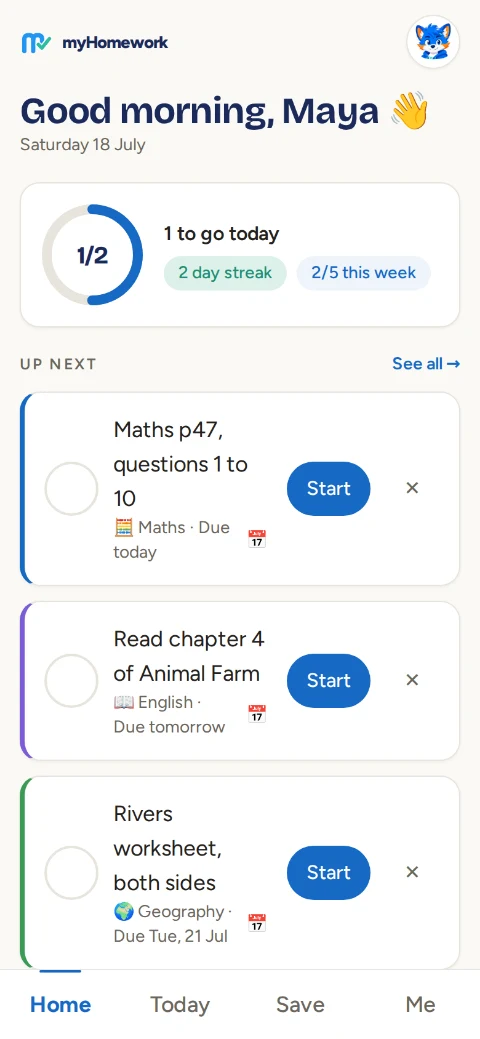

Inside the app
One calm screen for the whole week
- ✓A progress ring for today, so one glance says how much is left.
- ✓Every subject on its own page, with the class textbook saved so the coach can match how school teaches.
- ✓Streaks with three free rest days a week. Life happens; the streak survives.
- ✓A goal the student sets themselves, and confetti when the day is cleared.
Real screenshot from the app.
The evidence
Built on research, not hype
17% worse
In a randomised trial, students given an AI that hands out answers scored 17% worse in the exam afterwards. A tutor that only guides removed the harm. Ours never gives the answer.
Bastani et al., PNAS
+5 months
Well-designed homework is linked with about five months of extra progress a year at secondary school, and quality beats quantity.
Education Endowment Foundation
1-to-1
Step-by-step guided tutoring matched one-on-one human tutoring across 107 studies and 14,000 participants.
Journal of Educational Psychology
64% of teenagers already use AI chatbots, and most homework tools simply hand over answers (Pew Research). We built the alternative.
Every subject
From maths to drama, it speaks the subject

Plus computer science, history, geography, drama, art and more. All fourteen subjects →

For parents
Built for children, properly
- ✓No real names. Accounts are a nickname and a password, nothing else. Data stays in the UK.
- ✓Nothing is used to train AI models, and there are no adverts anywhere.
- ✓Designed to the UK Children's Code: highest privacy by default, no manipulative streaks, no leaderboards.
- ✓Parents can be invited to see exactly what the student sees. The student always knows what's shared.
- ✓If a child seems upset, the coach stops teaching and points to a trusted adult and Childline.
- ✓Everything can be deleted in one tap, by the student, without asking anyone.
Made for how you actually work
If homework systems usually defeat you, start here
Turn on what helps
- ✓Easier reading: wider spacing, taller lines, bigger text.
- ✓Calm mode: no movement, no decorative pictures.
- ✓Read aloud on any coach message, spoken on your device.
- ✓Big buttons, and dark or light mode.
Built in already
- ✓One instruction at a time, never a wall of tasks.
- ✓Nothing counts down and nothing expires.
- ✓Late work is marked clearly and never scolded.
- ✓Voice capture, so writing is never the barrier.
Pricing
Free during the beta
There will always be a free tier, and never an advert inside a child’s learning session.
Free
£0
- ✓ Unlimited homework capture and planning
- ✓ Subject pages, streaks and goals
- ✓ Reminders and add to calendar
- ✓ A few guided coach sessions a week

Free during beta
£9/month
Student Plus, when we launch
- ✓ Unlimited guided sessions
- ✓ Diagrams drawn on request
- ✓ One-tap revision posters
- ✓ Voice notes and saved class materials
- ✓ Set up by a parent, cancel any time
Family and school plans are coming. All the details →
Questions people ask
The honest answers
Does it do the homework for you?
No, and it will not, however hard you ask. The coach works down a hint ladder: it starts by asking you to explain the task in your own words, then gives a nudge, then a stronger clue, then walks the method with you. The final step is always yours.
Is this cheating?
The opposite. The design comes from a randomised trial where students given an answer-giving AI scored 17% worse in the exam afterwards, while a version that only guided removed the harm. Guided help is what tutoring has always been.
How old do you have to be?
Thirteen or over. Accounts are a nickname and a password, so no real name, no email address and no phone number for the student.
What does it cost?
It is free while we are in beta. When paid plans start it will be about £9 a month for a student, set up by a parent, and there will always be a free tier with the planner and a limited number of guided sessions.
Where is my data kept?
In London, on Supabase. Homework photos are private to the student, voice notes are turned into text and the audio is thrown away immediately, and nothing is used to train AI models.
Can parents see it?
Parents can be invited to see exactly what the student sees, and the student always knows what is shared. There is nothing hidden from either side.
Does it work on a school Chromebook?
Yes. It runs in the browser with nothing to install, and it can be added to a phone home screen so it behaves like an app.
Got homework sitting there right now?
Save it in about five seconds and see what the coach does with it.